Uwazi UI refactor
Four patterns, one list
Rebuilding the interface of Uwazi, without stopping the work it carries.
Juan M. Cornejo
Uwazi UI refactor
A notebook
This notebook covers one part of the Uwazi UI refactor: the four patterns that almost every screen was rebuilt on.
- Notes2
- The library, sketched3
- Four patterns, one list4
- What each pattern keeps5
- Try it6
- A table and its bar7
- The drawer8
- The four, side by side9
- In short10
Rebuilding the interface of Uwazi without stopping the work it carries.
1Uwazi UI refactor
Notes
- Each screen had been a sensible answer to a real request. They were made by different hands at different times, and none with the others in view.
- There was no handover file. I first rebuilt every implemented screen, feature and state in Figma from the live product.
- The rule: translate every feature one to one. Nothing dropped, no behaviour quietly changed. Inside that rule, almost everything fell into four patterns.
- Four, because a small open-source team can hold four in their heads and apply them without me reviewing every pull request.
- It shipped section by section into installations with live cases open, so old and new parts had to work side by side. There was no usability lab: each section’s reception was the test for the next.
2Notes
The library, sketched
Figure 1. The library, sketched in code. Ticked rows bring up a bar along the foot of the table, and one open item shows a drawer beside it.
3Uwazi UI refactor
Chapter 1
Four patterns, one list
Uwazi had grown screen by screen. The refactor rebuilt almost all of it on four patterns: a table, a drawer, a stepped modal and an action bar.
None of the four is new. The refactor applied them the same way on every screen, with every feature translated one to one.
The next page lists the four and what each keeps in place. Two pages on, all four run on one invented list.
4Four patterns, one list
What each pattern keeps
| Pattern | For | What stays in place |
|---|---|---|
| Almost every screen is built from these four | ||
| Table | anything that is a list of things | every list in the product, settings included |
| Drawer | editing one item | the table, and your place in it |
| Stepped modal | a process with stages | the page behind it |
| Action bar | actions on what is selected | the rows you ticked, until you change tab |
Table 1. The four patterns of the rebuilt interface, what each is for, and what it keeps in place.
5Uwazi UI refactor
Try it
| Select | Title | Type | Date |
|---|
Figure 2. The four patterns on one list of invented records and invented actions. This is a reimplementation in plain JavaScript, not the shipped product. Tick rows, click a row to open it, change tab, or add a record.
6Try it
A table and its bar
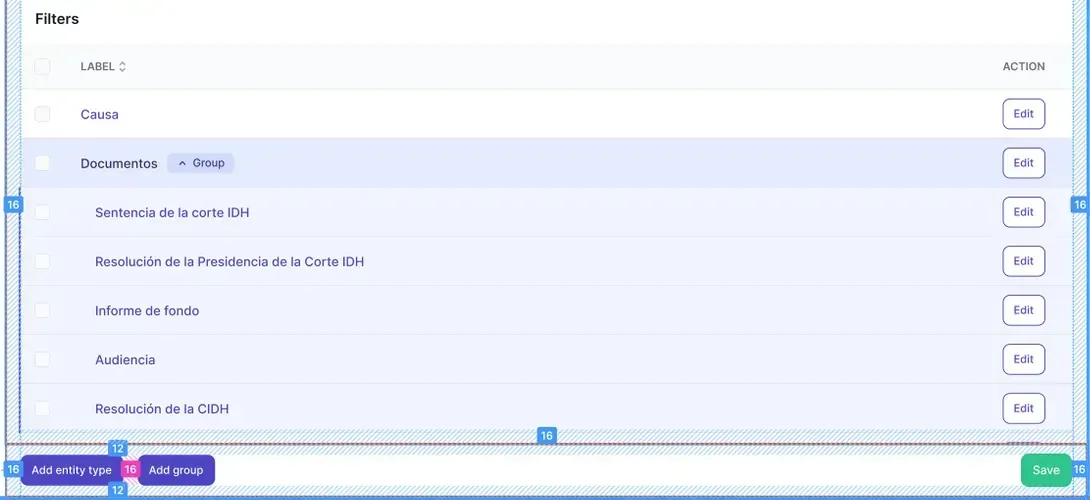
- 1A checkbox column: tick one row or all
- 2Each row’s own action
- 3A group, its rows indented under it
- 4The bar at the foot holds the list’s actions
- 5Save, at the same foot
Plate 1. Settings, Filters, from the 2023 refactor’s designs; the spacing marks are the designer’s. A list is a table with a checkbox column, and its actions sit in the bar at the foot.
7Uwazi UI refactor
The drawer
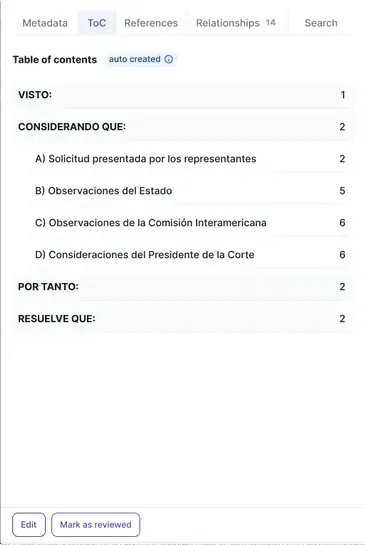
- 1One drawer, its views as tabs
- 2The table of contents, made for it
- 3A section of the document
- 4The page it starts on
- 5The item’s actions, at the drawer’s foot
Plate 2. The drawer: one item opens beside the table with its own tabs, here its table of contents, and the table stays where it was.
8The drawer
The four, side by side
Figure 3. The same list in the four patterns, one small screen each. The numbers below follow the screens in reading order.
- 1The table, under everything.
- 2The action bar, along the foot, when rows are ticked.
- 3The drawer, at the side, with the table still there.
- 4The stepped modal, over the page, on step two of three.
9Uwazi UI refactor
In short
The same table behaves the same way in settings as in the library, so someone who learns one section has learned the others.
A design system is only as much as the people implementing it can remember. Four patterns are few enough to remember.
The rest of the refactor is in the case study: the map of the old product, the document reader and the empty states.
10In short