Operator
Who may send work to whom
A Mac app for Claude Code. You run the agents: decide what each one does.
Juan M. Cornejo
Operator
A notebook
This notebook covers which lane in Operator may send work to another, and which must wait for me.
- Notes2
- The comms list, sketched3
- Who may send work to whom4
- Which lines count5
- Try it6
- The comms list7
- The board8
- The lanes and the gate9
- In short10
A Mac app for Claude Code. You run the agents: decide what each one does, then tune every lane's model and effort so the plan runs close to its limit and never past it.
1Operator
Notes
- A lane is one Claude Code agent. At the end of a turn it can write a dispatch: one line, OPERATOR-DISPATCH, the target lane in brackets, then the task.
- What happens first depends on the sender. The coordinator goes straight through. Any other lane, or a sender the app cannot identify, waits for me.
- The app decides by the lane’s role. The lane’s charter, its written instructions, is advice the app does not enforce.
- A lane told never to change code wrote a brief instead and dispatched the Code lane to build it. It followed the instruction to the letter.
- In my own data, 23 of 100 dispatches came from a lane other than the coordinator.
- There is no approve-all and no timeout. A held dispatch waits until I decide.
- A quoted, indented or fenced line is not a dispatch. A line with a bullet, a number or bold around it is.
- A dispatch to a suspended lane wakes it, and the task becomes its opening prompt.
- Every dispatch in the log carries a chip that says what happened to it: delivered, held or not delivered, and why.
2Notes
The comms list, sketched
Figure 1. The comms list, the app’s log of dispatches between lanes, sketched in code. Each row shows who sent a dispatch, to whom, and a chip, the small label for what happened to it. The dispatch that is waiting has two buttons.
3Operator
Chapter 1
Who may send work to whom
Operator runs several Claude Code agents side by side, one to a lane. A lane has its own role, model and permissions. Any lane can end a turn with a line that sends work to another lane. That line is a dispatch. The app reads these lines and decides where each one goes, and whether it goes at once.
Only the coordinator, the lane with the operator role, can send work without asking me. A dispatch from any other lane, or from a sender the app cannot identify, is held until I approve or decline it. Nothing approves itself.
The next page shows the line itself and which ways of writing it count. The page after that runs the rule: send work from any lane.
4Who may send work to whom
Which lines count
- plain
OPERATOR-DISPATCH [code] Fix the sign-in formcounts: [code] Fix the sign-in form - with a bullet
- OPERATOR-DISPATCH [code] Fix the sign-in formcounts: [code] Fix the sign-in form - in bold
**OPERATOR-DISPATCH [code] Fix the sign-in form**counts: [code] Fix the sign-in form - quoted
> OPERATOR-DISPATCH [code] Fix the sign-in formignored - in a code block
``` … ```ignored - indented
OPERATOR-DISPATCH [code] Fix the sign-in formignored - task starting with a dash
OPERATOR-DISPATCH [review] --all of yesterday’s changescounts: [review] Task: --all of yesterday’s changes
A line counts when it starts with the keyword OPERATOR-DISPATCH, after any bullet, number or bold marks. A quoted line is someone repeating the keyword, a line in a code block is an example, and an indented line is code, so none of the three counts. If a task starts with a dash, the app puts “Task:” in front, so a command-line tool cannot read it as an option.
Table 1. Each row was run through the app’s own parser, ported to this page, when the page was built. The code-block row stands for three lines: the opening fence (```), the line, the closing fence.
5Operator
Try it
Figure 2. Operator’s own rules, running here. Its parser reads the turn, its approval rule holds the dispatch, and its router picks the lane. Choose which lane is speaking, or tap a lane to change its state. The lanes and tasks are invented.
6Try it
The comms list
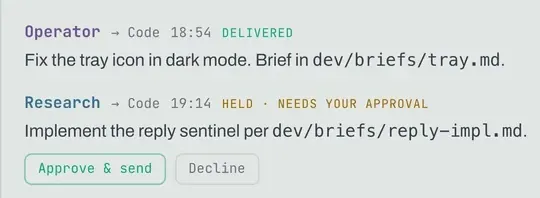
- 1The coordinator sends: the dispatch goes straight through
- 2DELIVERED
- 3Another lane sends
- 4HELD, until I choose
- 5Approve or decline: the only ways out
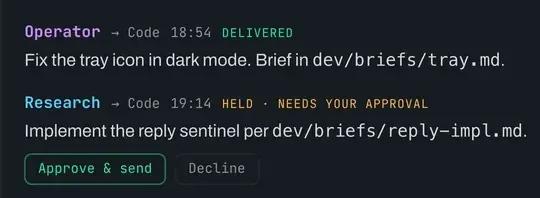
Plate 1. The comms list, one row a dispatch, as the site’s panel draws it with invented lanes and tasks. The coordinator’s dispatch went straight through; the other lane’s waits for me, with two buttons.
7Operator
The board
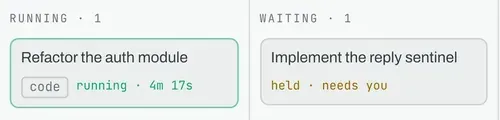
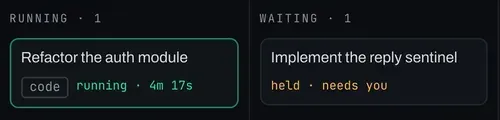
- 1Waiting: where held work stands
- 2The held dispatch’s task, the same sentence
- 3held, needs you
- 4Running, with the lane’s chip on the card
Plate 2. Two columns of the board beside it, in the same drawn panels: the task I have not approved sits in Waiting, marked held, and moves on only when I decide.
8The board
The lanes and the gate
Figure 3. The gate seen from above. The coordinator’s line passes through its one opening. Every other lane’s line stops at the ring until I approve it.
- 1The coordinator’s dispatch goes straight to the lane it names.
- 2A dispatch from any other lane stops at the gate and waits for me.
- 3After that, both are routed the same way: to the running lane, to a suspended lane, which wakes, to a new lane, or nowhere, with a chip that says why it was not delivered.
9Operator
In short
Two rules decide what happens to a dispatch. The parser decides whether the line counts, and the approval rule decides whether it waits for me.
The approval rule reads the lane’s role, not its instructions. An instruction is followed to the letter, and a letter can be worked around.
“A timeout that approves is not a guardrail.”
From the README.
The rest of Operator is in the case study: the plan meter, a model and an effort level for each lane, and a git worktree for each task.
another notebook Photo Importer
10In short